In short: A cron job Linux server teams rely on is a command the cron daemon runs from a crontab schedule. Five fields (minute, hour, day of month, month, day of week) describe when it fires — for example 0 2 * * * runs daily at 02:00. This guide stays OS-generic and follows crontab(5); we do not invent CWP menu paths that we have not verified.
Cron runs repeating work (backups, log cleanup, certificate hooks, maintenance scripts) without a human at the keyboard. Each user can have a crontab; jobs run as that user. System-wide jobs use /etc/crontab and /etc/cron.d/, which need a username field after the five time fields.
If you connect over SSH, start with what SSH is and how to connect. More server topics live under Server Management.
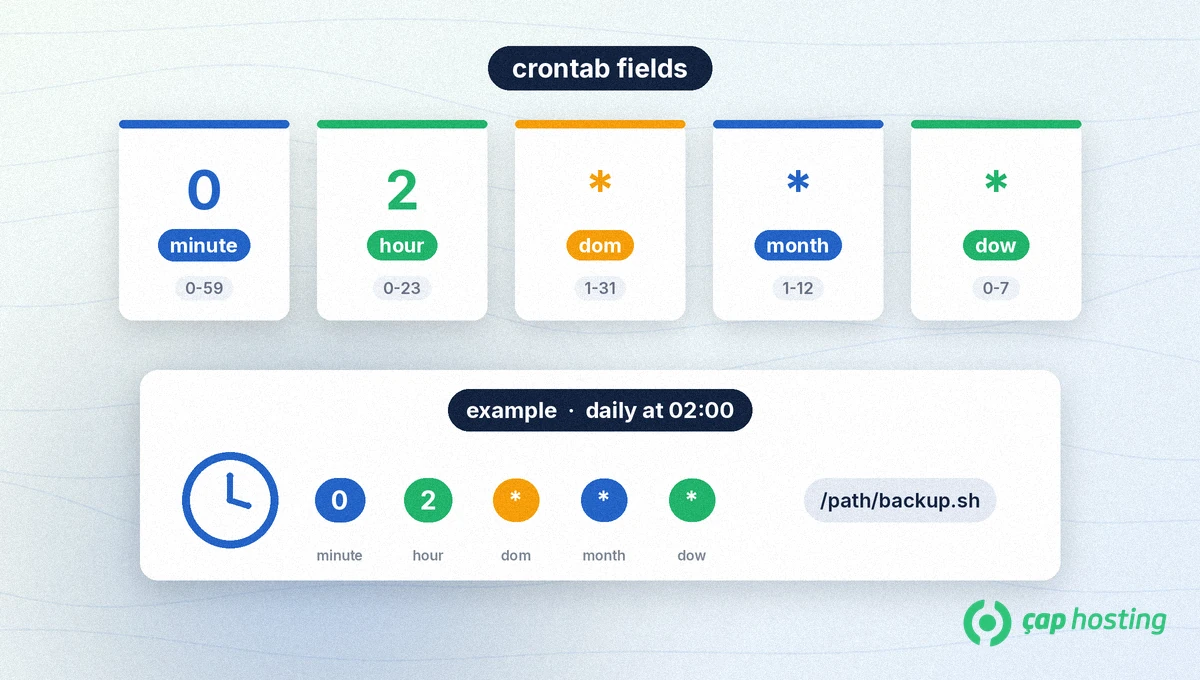
A user crontab line is: minute hour day-of-month month day-of-week command. Per crontab(5), allowed values are:
| Field | Allowed values |
|---|---|
| minute | 0–59 |
| hour | 0–23 |
| day of month | 1–31 |
| month | 1–12 (or short names: jan, feb, …) |
| day of week | 0–7 (0 or 7 = Sunday; or mon, tue, …) |
* means “every value” in that field.8-11 (hours 8, 9, 10, 11).1,15 or mon,wed,fri.*/15 or 0-23/2.Note: If both day-of-month and day-of-week are restricted (neither is *), the job runs when either field matches. Example: 30 4 1,15 * 5 → 04:30 on the 1st and 15th or every Friday at 04:30.
crontab(1) manages per-user tables stored under /var/spool/cron/ (or /var/spool/cron/crontabs/ on some distros). Edit via these commands, not by hand-editing spool files:
crontab -e — opens your editor (VISUAL or EDITOR); saving installs the table.crontab -l — lists the current table.crontab -r — removes the table (use care; some builds offer -i to confirm).crontab -u user -e — as root, edit another user's table.Example lines:
# Daily backup at 02:00
0 2 * * * /usr/local/bin/backup.sh >> /var/log/backup.log 2>&1

# Top of every hour on weekdays
0 * * * 1-5 /usr/local/bin/hourly-check.sh

# Every Sunday at 05:05
5 4 * * sun /usr/local/bin/weekly.sh
Some cron builds also accept nicknames such as @daily, @hourly and @reboot (@daily ≈ 0 0 * * *). Check your local crontab(5) for support.
System jobs use: minute hour dom month dow user command — a username sits between the schedule and the command. Files:
/etc/crontab — main system crontab/etc/cron.d/ — drop-in system jobs from packages or adminsUser crontabs have no username field; system files do. Do not mix the formats.
Cron does not load your interactive shell profile. Per the man page, SHELL defaults to /bin/sh; HOME and LOGNAME come from /etc/passwd. If your script lives under /usr/local/bin, set an explicit PATH=... at the top of the crontab or use absolute paths. Job output is usually mailed to the crontab owner; set MAILTO=address or MAILTO="" to change that. Redirecting to a log file is practical: ... >> /var/log/job.log 2>&1.
/.cron.allow / cron.deny control who may use the crontab command (not whether existing jobs keep running).If you need help with scheduled tasks on your VPS or server plan, contact our support team.
It is a command the Linux cron service runs on a schedule from a crontab line — for example 0 2 * * * runs every day at 02:00.
crontab -e edits your user table with no username field. /etc/crontab is a system file and requires a username after the five time fields.
Confirm the line with crontab -l, run the command by hand, use absolute paths or set PATH, and inspect cron logs via /var/log/syslog or journalctl.
It runs every minute. That can overload a server; avoid it unless you truly need that frequency.
 Copyright © 2026 All Rights Reserved

 Turkey (Türkçe)
 Worldwide (English)