In short: The MySQL vs MariaDB question comes down to two relational databases that share the same roots but are now developed by different teams and drift further apart with each release. A typical website such as WordPress runs on both; the real differences show up in migrations, replication, JSON and collations.
Open the database section of a hosting panel and you may see "MySQL" on one account and "MariaDB" on another. Both understand the same SQL and connect through the same PHP extension, so most users only notice a difference when a migration fails. This guide compares the two servers, explains which one fits your website in which situation and lists what to check when you move between them. For the performance side, see our article on database performance and SQL optimization.
MySQL is one of the most widely used open-source relational database servers for web applications and is developed by Oracle today. The Community Edition is free; commercial editions are offered alongside it.
MariaDB Server is a fork of MySQL which, in the MariaDB Foundation's words, is made by the original developers of MySQL. Michael "Monty" Widenius founded both MySQL and MariaDB, and the foundation commits to keeping MariaDB Server open source under the GPLv2 licence.
From the application's point of view the two still speak the same language: MariaDB's client protocol is binary compatible with MySQL's, and MySQL connectors for PHP, Python or Java work with MariaDB unchanged.
| Criterion | MySQL | MariaDB | What it means in practice |
|---|---|---|---|
| Developed by | Oracle | MariaDB Foundation and community, MariaDB Corporation | Different roadmaps and release schedules |
| Licence | Community Edition GPLv2, plus commercial editions | GPLv2 | Both are free to run on your own server |
| Long-term support | 8.4 LTS and 9.7 LTS | 10.11, 11.4 and 11.8 LTS | A release without support gets no security fixes |
| Application access | MySQL connectors | The same connectors work unchanged | No visible difference for WordPress and PHP sites |
| Default collation | MySQL 8: utf8mb4_0900_ai_ci | Older releases do not know this name; mapped from 11.4.5 | The most common migration error |
| JSON | Native JSON data type | JSON values stored and compared like text | Apps with JSON columns need testing |
| Replication | MySQL GTIDs | Different GTID design, Galera Cluster | Mixed replication has to be rebuilt |
The LTS row matters. According to MariaDB's maintenance table, community support for 10.11 ends on 16 February 2028 and for 11.4 on 29 May 2029, while the 10.6 series reached end of life on 6 July 2026. On the MySQL side, standard support for the 8.0 series has ended, and 8.4 LTS and 9.7 LTS (released in April 2026) are the long-term options.
For most sites the useful question is not "which is better" but "which one, in which version, does my application support".
To find out which server you are on, run SELECT VERSION(); in the SQL tab of phpMyAdmin. On MariaDB the version string contains the word "MariaDB".
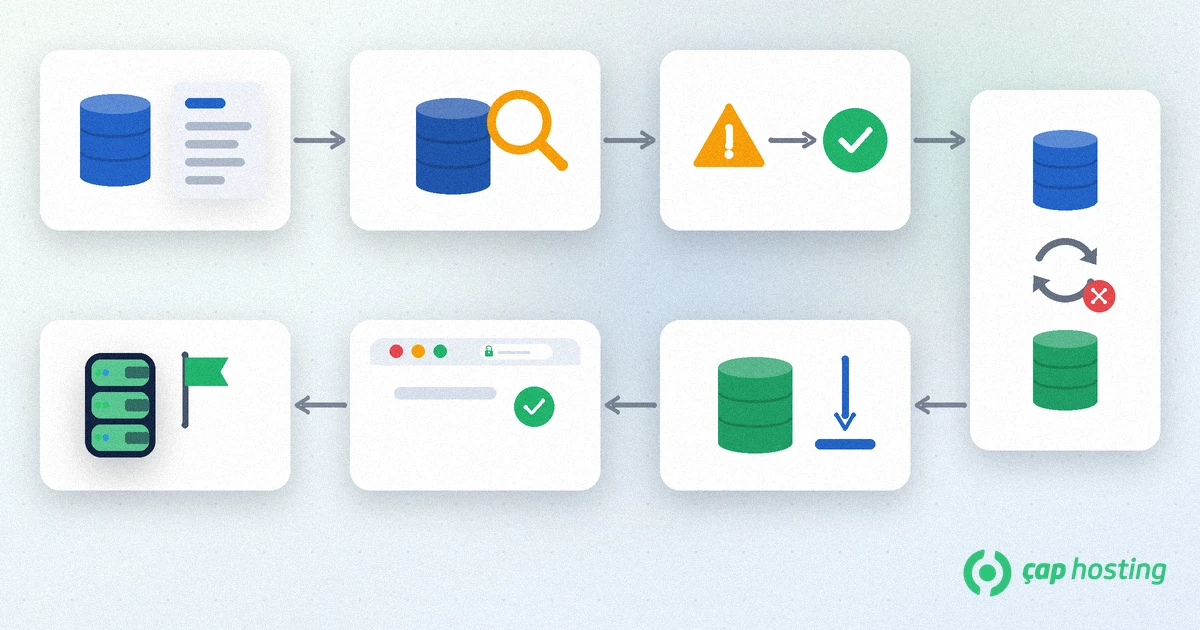
Before you start, back up a full database dump and the site files, and never migrate without a way back. Our guide to website backups and backup strategy covers this step.
MariaDB states that mariadb-upgrade can upgrade data files from MySQL releases prior to 8.0. With a MySQL 8.x source, the usual route is a dump on the source and an import on the target. MariaDB's compatibility page also points out that the differences grow with each new version.
Importing a MySQL 8 dump into an older MariaDB release often fails with "Unknown collation: 'utf8mb4_0900_ai_ci'". Either use MariaDB 11.4.5 or newer on the target, or replace that collation name in the dump with one the target supports, such as utf8mb4_unicode_520_ci.
After the import, test tables with JSON columns through the application's own queries. If you use replication, set it up again on the target, because the GTID implementations differ.
Point a test copy of the site at the new database first and try forms, search and the admin area. If everything works, switch the connection settings and go live. If the server or the hosting company changes too, our website migration guide gives the order for a move without downtime.
In summary, MySQL and MariaDB are interchangeable for most websites; version support, migration details and your application's requirements make the difference. If you want to check the database version on your ÇAP Hosting account or plan a move, open a support ticket and mention the application and version you use.
For application access, largely yes: the same client protocol and connectors are used. But differences in JSON, collations and replication grow with each release, so test before you switch.
WordPress supports both and recommends MariaDB 10.11 or greater or MySQL 8.0 or greater. Being on a supported, current version matters more than which one you pick.
Run SELECT VERSION(); in the SQL tab of phpMyAdmin. If the result contains MariaDB, you are on MariaDB; if it shows only a version number, you are on MySQL.
MySQL 8's default collation name is not defined in older MariaDB releases. Use MariaDB 11.4.5 or newer on the target, or replace the collation name in the dump with a supported one.
 Copyright © 2026 All Rights Reserved

 Turkey (Türkçe)
 Worldwide (English)