In short: An expired domain is a domain name that was not renewed by its expiry date. Soon after it expires, your website and e-mail usually stop working. For generic extensions such as .com and .net, the domain first goes through a renewal window set by the registrar; if it is deleted, it enters a 30-day redemptionPeriod and then a 5-day pendingDelete stage before anyone can register it. The sooner you notice, the easier and cheaper it is to recover.
A missed renewal rarely comes from carelessness. More often it is a small mishap: the saved card has expired, reminder e-mails go to an address nobody reads, or the employee who managed the domain has left the company. This article explains step by step what happens when your domain name expires, how it can be recovered at each stage and what you can do so it never happens again.
The domain is not taken away the moment it expires, but your services start to be affected. ICANN's Expired Registration Recovery Policy (ERRP) for generic extensions requires the registrar to interrupt the domain's DNS resolution at a certain point. If the registrar deletes the domain 8 or more days after expiry, DNS is interrupted for at least the last 8 consecutive days in which the domain can still be renewed. If a parking page is shown instead, it must say clearly that the domain has expired and explain how to renew it.
In practice this means:
Your hosting account and files stay where they are during this process; the only problem is that the domain no longer points to the right place.
The stages below apply to ICANN-governed generic extensions (gTLDs) such as .com, .net and .org. At each stage the domain's WHOIS/RDAP record shows a different EPP status code.
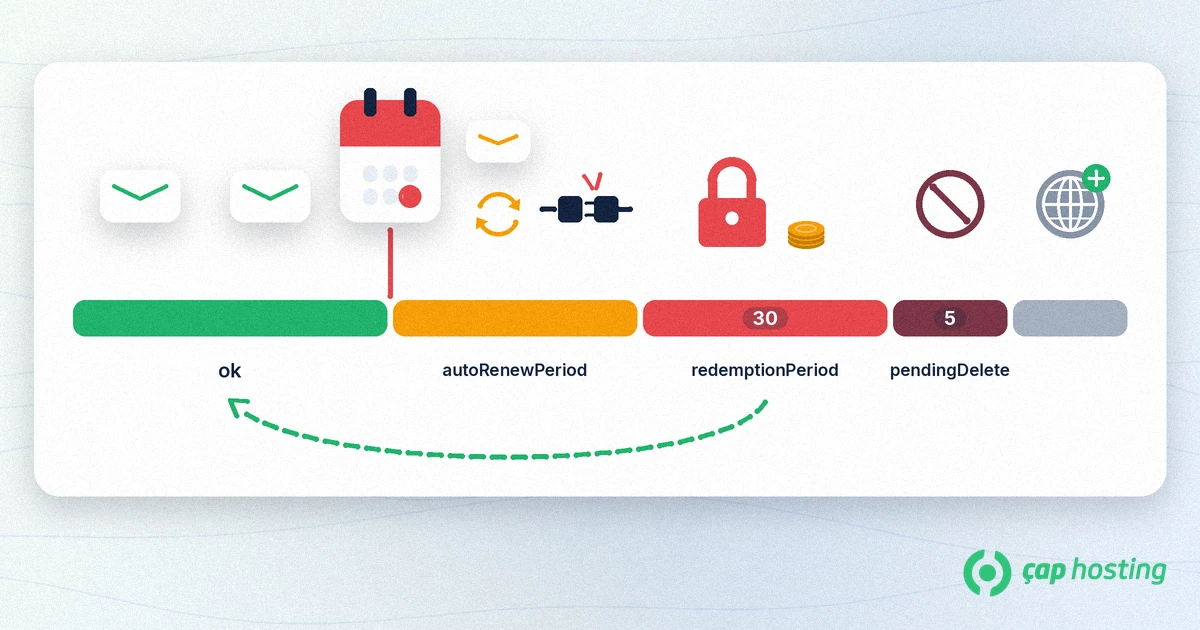
Under the ERRP, the registrar sends at least two reminders, about one month and about one week before expiry, and one more notice within 5 days after expiry if the domain has not been renewed. These messages go to your registered contact address, so keeping that address up to date is critical.
On the expiry date the registry usually extends the domain by one year automatically, and the status becomes autoRenewPeriod. During this window you can usually get the domain back through your registrar at the normal renewal price. However, the length of this window is not fixed: the ERRP says the registrar may delete the domain at any time after expiry. Always check the exact period and price in your own registrar's terms.
If the registrar deletes the domain, it enters a 30-day redemptionPeriod. During this time DNS is disabled, the domain cannot be transferred to another provider and it can only be restored through the registrar that deleted it. Restoring usually involves an extra redemption fee that is noticeably higher than a normal renewal.
If the redemption period also passes, the domain moves to pendingDelete for 5 days. At this stage it can no longer be restored. When the period ends, the domain is released and can be registered by whoever applies first; valuable names are often caught within minutes by automated backorder services.
The ICANN rules above do not cover country-code extensions (ccTLDs). For extensions such as .com.tr or .tr, renewal, suspension and deletion follow the rules of that extension's registry and may differ from generic extensions. If you have such a domain, ask your registrar directly about the recovery period and price instead of relying on assumptions.
For generic extensions, the length of the renewal window after expiry is set by the registrar. If the domain is deleted, a paid restore is possible during the 30-day redemptionPeriod; during the 5-day pendingDelete stage that follows, it can no longer be restored.
No. Your hosting account is a separate service and your files stay in place as long as it is active. Once the domain is renewed and DNS resolves again, the site comes back online.
No. Transfers are prohibited at this stage; the domain can only be restored through the registrar that deleted it. After restoring it, you can move it in line with the transfer rules.
The most common reasons are an outdated contact address or an address on the expiring domain itself. Keep your contact details current and add a second address outside the domain.
 Copyright © 2026 All Rights Reserved

 Turkey (Türkçe)
 Worldwide (English)