In short: DMARC is a DNS TXT record in which you, as the domain owner, answer the question "what should happen to email sent in my name that fails SPF or DKIM?" The receiving server checks whether the domain in the visible From address was authenticated by SPF or DKIM, and then delivers, sends to spam or rejects unauthenticated messages according to your policy. The safest path is to start DMARC with p=none, study the reports and move step by step to p=quarantine and p=reject.
An attacker does not need to break into your account to send your customers an "invoice attached" email from your domain; the email protocol lets anyone write any sender address. SPF and DKIM partly close this gap, but they do not tell the receiver what to do when authentication fails. In this article we explain what DMARC is, how it works together with SPF and DKIM, how to write the record and how to move to a strict policy without putting your own email at risk.
DMARC (Domain-based Message Authentication, Reporting and Conformance) is an email authentication standard defined in 2015 in RFC 7489. It does three things: it checks whether the domain in the message's From line was actually authenticated, it applies the domain owner's policy to messages that fail, and it makes receiving servers send regular reports to the domain owner.
Why does this matter? SPF only checks the envelope sender (MAIL FROM, Return-Path), not the From address the user sees in their mail app. A fraudster can pass SPF with their own domain and still put your address in the From line. DMARC closes exactly this gap: it requires the authenticated domain and the visible domain to be aligned (the same domain, or part of the same organizational domain).
Large mailbox providers now expect DMARC too. Since February 2024, Google has required domains that send more than 5,000 messages a day to Gmail addresses to have SPF, DKIM and a DMARC record with at least p=none (Google sender guidelines), and Yahoo introduced similar rules at the same time. Microsoft has applied comparable rules to Outlook.com since 5 May 2025. Even for a business that sends little email, DMARC is a basic setting that protects your domain's reputation and deliverability.
The three records answer different questions:
d= value in the signature shows which domain signed it.For a message to pass DMARC, it is enough for SPF or DKIM to both pass and be aligned. In practice DKIM is more reliable: when a message is forwarded to another address, the sending server changes and SPF breaks, while the DKIM signature usually survives. That is why we recommend turning on DKIM signing for every source that sends your email.
A DMARC record is a TXT record added at the _dmarc name under your domain. The simplest starting record looks like this:
_dmarc.yourdomain.com TXT "v=DMARC1; p=none; rua=mailto:[email protected]"
The main tags are:
v=DMARC1: The version; it must always be the first tag.p=: The policy. none only monitors, quarantine sends failing messages to spam, reject refuses them.rua=: The address for aggregate reports. Reports usually arrive once a day as compressed XML.sp=: A separate policy for subdomains. If omitted, the main policy applies.adkim= and aspf=: The alignment mode. The default r (relaxed) accepts the same organizational domain; s (strict) requires an exact match.pct=: The percentage of messages the policy applies to; useful for a gradual rollout.You can see your current record in a terminal with dig +short TXT _dmarc.yourdomain.com (DNS checks with dig and nslookup). As an example, this is the record returned for caphosting.net on 17 November 2026:
"v=DMARC1; p=quarantine; rua=mailto:[email protected]; ruf=mailto:[email protected]; fo=1; adkim=s; aspf=s"
A domain must have only one DMARC record; if there are two, receivers do not apply DMARC at all.
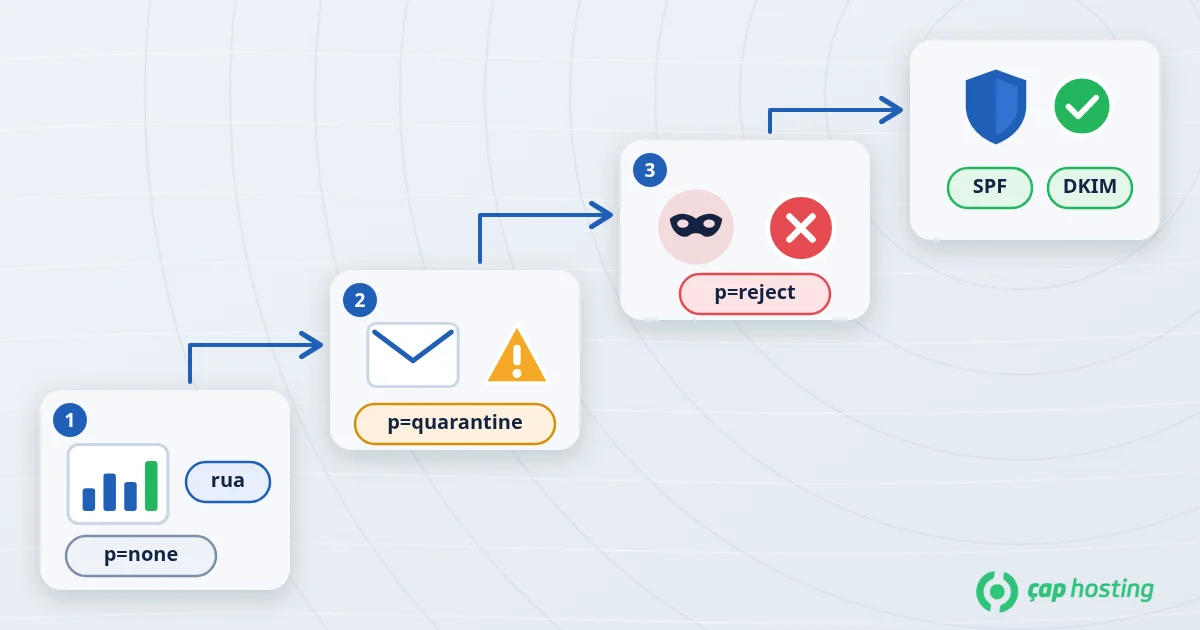
List everything that sends email with your domain: your hosting mail server, Google Workspace or Microsoft 365, website form notifications, newsletter, CRM and invoicing systems. Check that each one is included in SPF and, where possible, signs with DKIM using your own domain. You usually turn on DKIM in your hosting panel or in the email service's admin console and add the TXT record it gives you to DNS.
Publish the record with p=none and an rua address. At this stage no delivery is affected; you only collect reports. Using a separate mailbox for reports keeps your quota from filling up. If you want reports sent to an address on another domain, that domain must authorize it with a DNS record.
Review the reports for at least two to four weeks. Reading XML files by hand is tedious; a free or paid DMARC report tool shows sending IP addresses and which check failed in a table. If you see a source you recognize that fails DMARC, finish its SPF/DKIM setup. Sources you do not recognize are most likely spoofed messages sent in your name.
When all of your legitimate sources pass DMARC, change the policy to p=quarantine. If you want to be careful, apply it to part of your mail first with pct=25, watch the reports, and raise the percentage if nothing breaks.
After a few trouble-free weeks, switch to p=reject. Spoofed messages using your domain are now refused by receiving servers. Keep watching the reports: if you add a new service and forget to add it to SPF and DKIM, its messages will be rejected too.
sp=reject.DMARC ties SPF and DKIM to a policy, stops your domain from being used in spoofed email and shows you who is sending in your name. Start with monitoring, fix your legitimate senders based on the reports, then move step by step to p=reject. If your messages still land in spam, see why are my emails going to spam. Using corporate email is also a good start for making mail from your domain look trustworthy. If you would like us to review your DNS records with you, you can open a support ticket.
The p=none policy does not affect delivery; it only collects reports. Move to the quarantine and reject policies, which do affect delivery, only after reviewing the reports and verifying all of your legitimate senders.
Yes. Someone sending spoofed email does not care about your sending volume; they use the trust in your domain. DMARC is the most effective way to limit spoofing of your domain.
A separate mailbox for reports is recommended, because daily XML reports take up space over time. You can also send the reports to a DMARC analysis service.
Once the record has propagated in DNS. The time depends on the record's TTL; receiving servers usually start seeing the new policy within a few hours. See DNS propagation for details.
 Copyright © 2026 All Rights Reserved

 Turkey (Türkçe)
 Worldwide (English)