In short: mysqldump is a command-line tool that dumps a MySQL or MariaDB database, tables and data included, into a single .sql file. You connect to the server over SSH, take a backup with mysqldump -u user -p database > backup.sql and restore it with mysql -u user -p database < backup.sql. This guide walks you step by step through the options needed for a consistent backup, compression, checking that the file is complete, restoring and the most common errors.
DB_NAME, DB_USER and DB_PASSWORD lines in wp-config.php.df -h.mariadb-dump; the mysqldump name still works for compatibility and the options are the same (MariaDB documentation). For the differences between the two systems, see our MySQL vs MariaDB article.Writing the password as -pPassword stores it in your shell history. Type only -p instead and the tool will prompt for it. For scheduled backups, use a ~/.my.cnf file in your home directory that only you can read:
[client]
user=database_user
password=StrongPassword
chmod 600 ~/.my.cnf
When this file exists, mysqldump and mysql read the user name and password from it, so you do not need -u and -p in your commands.
The basic command is:
mysqldump -u database_user -p --single-transaction --routines --default-character-set=utf8mb4 database_name > backup-$(date +%F).sql
What the options do:
--single-transaction: dumps InnoDB tables as a single consistent snapshot without locking them, so the site keeps working during the backup. This consistency is not provided for MyISAM tables.--routines: also includes stored procedures and functions. Triggers are included by default.--default-character-set=utf8mb4: keeps accented characters and emoji intact. See our utf8 vs utf8mb4 article for details.$(date +%F): adds today's date to the file name (e.g. backup-2026-11-19.sql) so backups do not overwrite each other.To back up several databases into one file, use --databases db1 db2; the file will then also contain CREATE DATABASE statements.
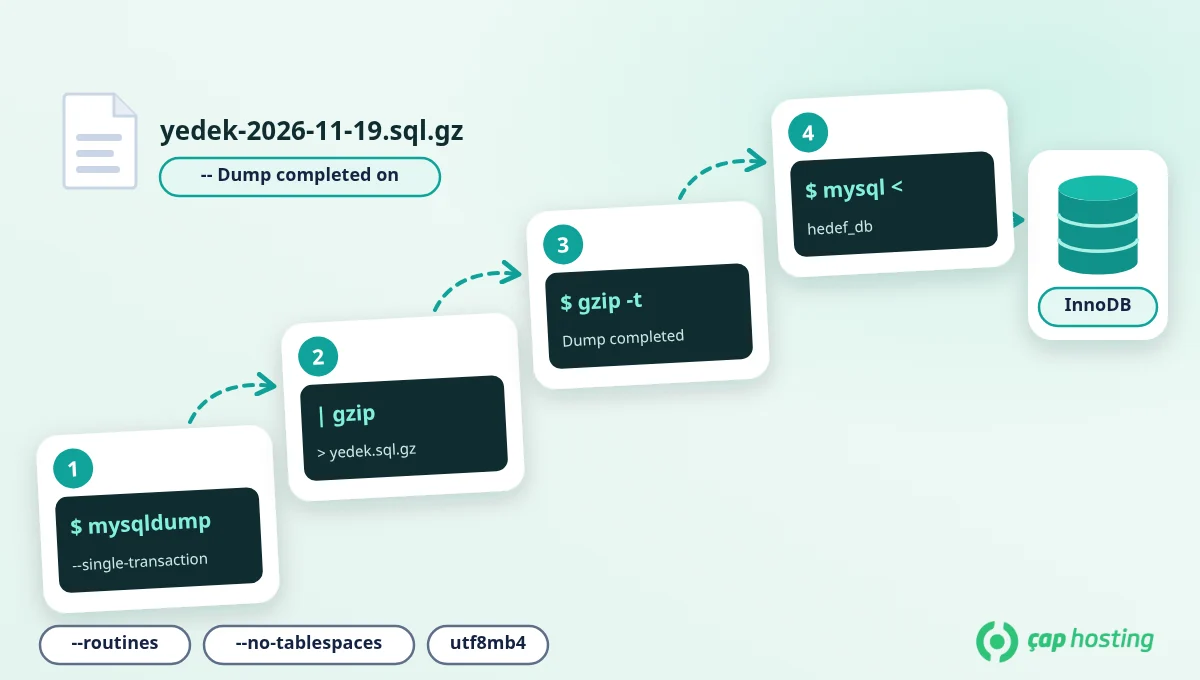
SQL files are plain text and compress very well. Pipe the output straight into gzip to get a compressed backup without leaving an uncompressed copy on disk:
mysqldump -u database_user -p --single-transaction --routines --default-character-set=utf8mb4 database_name | gzip > backup-$(date +%F).sql.gz
A command finishing without an error is not enough on its own; a dump that stops halfway still produces a file. Run these three checks:
ls -lh backup-*.sql.gz
gzip -t backup-2026-11-19.sql.gz
zcat backup-2026-11-19.sql.gz | tail -n 1
The file size should look reasonable, gzip -t should print nothing, and the last line should start with -- Dump completed on. If that line is missing, the dump was cut short.
A backup that only lives on the same server can be lost together with the server. Download it from a terminal on your own computer (use -P if your SSH port is different):
scp -P 22 user@server_ip:~/backup-2026-11-19.sql.gz .
If you prefer a file transfer program to the command line, use the SFTP connection described in our FTP file transfer guide.
Restoring into an empty database is the safest option. After creating the database and its user in your control panel:
mysql -u database_user -p target_database < backup-2026-11-19.sql
For a compressed backup:
zcat backup-2026-11-19.sql.gz | mysql -u database_user -p target_database
Note: by default mysqldump writes a DROP TABLE statement before each table. If you restore into a database that already has data, tables with the same names are dropped and recreated from the backup. Back up the current state as well before restoring into a live database.
| Error | Fix |
|---|---|
Access denied for user |
The user name, password or database name is wrong, or the user has no privileges on this database. Verify the details in your control panel. |
you need (at least one of) the PROCESS privilege(s) |
In MySQL 8 this privilege is required to dump tablespace information. Add --no-tablespaces to the command; website databases do not need that information. |
Unknown collation: 'utf8mb4_0900_ai_ci' |
A backup taken from MySQL 8 is being loaded into a MariaDB version that does not know this collation. Replace it with sed -i 's/utf8mb4_0900_ai_ci/utf8mb4_unicode_ci/g' backup.sql and try again. |
Unknown command '\-' on line 1 |
Recent MariaDB versions add a "sandbox mode" line at the top of the dump, which the MySQL client does not understand. Remove it with sed -i '1{/sandbox mode/d}' backup.sql. |
Got a packet bigger than 'max_allowed_packet' |
The backup contains very large rows. Try mysql --max-allowed-packet=256M ... when restoring; if the server-side limit is also low, ask the support team for help. |
Instead of running the backup by hand every day, automate it with a script and a scheduled task. Once ~/.my.cnf is in place, create a script called ~/db-backup.sh:
#!/bin/sh
mkdir -p ~/backups
mysqldump --single-transaction --routines --default-character-set=utf8mb4 database_name | gzip > ~/backups/backup-$(date +%F).sql.gz
find ~/backups -name 'backup-*.sql.gz' -mtime +7 -delete
The last line deletes backups older than 7 days. Make the script executable with chmod 700 ~/db-backup.sh and add it with crontab -e to run every night at 03:00:
0 3 * * * /home/user/db-backup.sh
If you put the command directly into a crontab line, the % character has a special meaning in crontab and must be written as \%; using a script avoids this problem. For the scheduling syntax, see our Linux cron job guide. Backups kept on the server are not enough on their own; copy them off the server regularly as well.
If your shared hosting account has no SSH access, or you hit an error during restore that you cannot solve, open a support ticket and include the error message.
With --single-transaction, InnoDB tables are not locked and the site keeps working. On large databases disk usage can rise during the backup, so running it at low-traffic hours is a good habit.
Yes. List the table names after the database name: mysqldump -u user -p database_name wp_posts wp_postmeta > tables.sql.
A .sql.gz file is compressed; open it with an archive tool first. Very large .sql files open slowly in ordinary text editors, which does not mean the file is damaged. Check integrity with gzip -t and the "Dump completed" line at the end.
For small databases, phpMyAdmin's export feature is enough. For large databases the command line is more reliable, because operations run through the browser can hit PHP time and size limits.
 Copyright © 2026 All Rights Reserved

 Turkey (Türkçe)
 Worldwide (English)