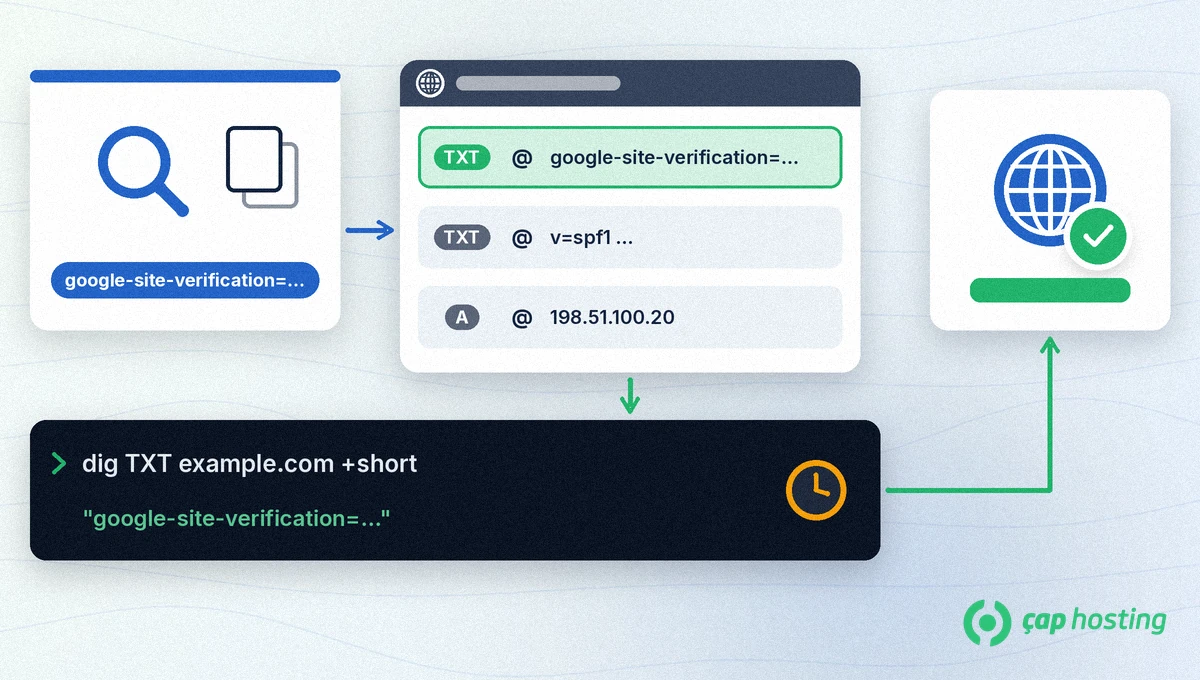
In short: Search Console domain verification means adding the value Google gives you, which starts with google-site-verification=, to your domain's DNS as a TXT record and then completing verification in Search Console. A Domain property verified this way covers the http and https versions and every subdomain in a single property.
Search Console has two property types. A Domain property (for example example.com) includes all protocol (http/https) and subdomain variations of your site and can only be verified with a DNS record. A URL-prefix property (for example https://www.example.com/) covers only the address you enter and can also be verified with methods such as an HTML file or an HTML tag. Verifying the root domain verifies all of its subdomains, but verifying a subdomain does not verify the root domain.
The TXT record must be added at the DNS provider your domain's nameservers point to. A record added anywhere else will not be seen by Google. You can check the nameservers with:
dig NS example.com +shortOn Windows, nslookup -type=NS example.com shows the same information. Whichever provider the nameservers belong to is where you add the record. Our nameserver guide explains the concept, and our DNS records guide explains what a TXT record is for.
https:// or www (for example example.com).google-site-verification=. Keep the dialog open.@, as your provider's documentation describes, and paste the copied text into the value field.v=spf1 …), leave them unchanged and add the verification value as a separate, new TXT record.dig TXT example.com +short should show your value. On Windows you can use nslookup -type=TXT example.com, and Google's Admin Toolbox Dig tool works from the browser.If you are not sure you added the record in the right place, you can open a support ticket at ÇAP Hosting. The full official instructions are on the Search Console Help page.
No. Search Console periodically checks whether your verification token is still present and valid. If you remove the record, verification can no longer be confirmed and after a grace period you lose your permissions for the property.
Yes. A Domain property combines data for the http and https versions and every subdomain, such as www, m or blog, in a single property.
According to Google it can take a few minutes or even days, and a provider may need up to two or three days to start serving a manually added record. If verification fails, wait a day or two and try again.
No. A name can hold more than one TXT record. Leave your SPF record as it is and add the verification value as a separate TXT record.
No. Verifying the root domain (example.com) also verifies its subdomains, but verifying a subdomain does not verify the root domain.
 Copyright © 2026 All Rights Reserved

 Turkey (Türkçe)
 Worldwide (English)