In short: DNS propagation is the time it takes for a DNS change on your domain (a new IP address, a new MX record or new nameservers) to become visible on resolvers around the world. Nothing actually "spreads": the old record cached by internet providers and public DNS resolvers simply expires when its TTL runs out, and the new one is fetched. Record changes usually take as long as the old record's TTL, while nameserver changes generally take longer.
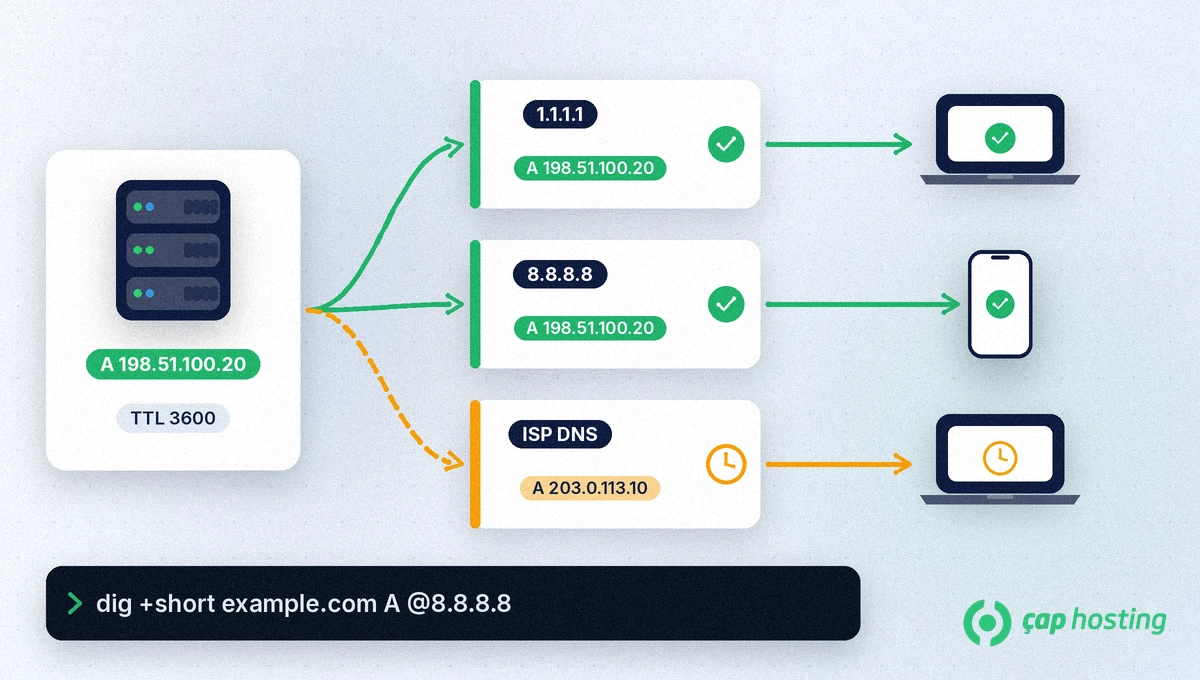
When a visitor opens your site, their computer does not ask your DNS server directly; it asks the cache of their internet provider or a public resolver such as 1.1.1.1 or 8.8.8.8. Every DNS record carries a TTL (Time To Live, in seconds) that says how long it may be kept in those caches; the field is defined in RFC 1035. If you change an A record with a TTL of 3600, a resolver that has just cached the old record may keep serving it for up to an hour. That is why one user can already see your new site while another, in a different city, still reaches the old server.
For what A, MX and other record types do, see what are DNS records.
Tip: before a planned migration, lower the TTL of the relevant record to 300 seconds at least one old-TTL period in advance. The change then propagates within minutes, and you can raise the TTL again once the move is complete.
Replace example.com with your own domain in the commands below. Use dig on Linux and macOS and nslookup on Windows:
dig +short example.com A @8.8.8.8 and dig +short example.com A @1.1.1.1: show which IP the Google and Cloudflare resolvers return right now.dig example.com A +noall +answer: also shows the remaining TTL; as it approaches zero, the switch to the new record gets closer.dig +short example.com NS: shows which nameservers the domain points to.dig +trace example.com: follows the lookup step by step from the root servers and shows the current answer independently of caches.nslookup example.com 1.1.1.1: sends a query to a specific DNS server on Windows.If the authoritative server and public resolvers already return the new record but you still see the old site, the problem is most likely your local cache.
On Windows, ipconfig /flushdns clears the computer's DNS cache, and restarting the browser resets its own cache. Public resolvers let you request a cache flush for a specific domain: Google Public DNS Flush Cache and Cloudflare 1.1.1.1 Purge Cache. You cannot clear your internet provider's cache; there you have to wait for the TTL to expire.
When moving hosting, keep both the old and the new server running during propagation so visitors always find a site and emails always find a mailbox, whichever server they reach. Our guide on how to migrate a website to a new host walks through the steps. If you still see the old record after 48 hours, open a support ticket.
That figure mostly applies to nameserver changes. For normal record changes the old record's TTL is what counts, and with a low TTL the change can complete in minutes.
Lowering the TTL before the change is the most effective method. After the change you can clear your local cache and the caches of public resolvers, but you cannot force internet providers to refresh.
Each user relies on a different resolver, and each resolver cached the old record at a different time. Once the TTL expires, everyone moves to the new record.
Not if the old mail server stays online; some messages land on the old server and some on the new one. Check both mailboxes until the move is complete.
 Copyright © 2026 All Rights Reserved

 Turkey (Türkçe)
 Worldwide (English)