In short: The IMAP vs POP3 difference is where your email lives. IMAP keeps messages on the server and syncs folders and read status across every device; POP3 usually downloads messages to a single device. For teams that use business email on more than one device, IMAP is almost always the right choice; POP3 only makes sense for special cases that need one device and a local archive.
When you add a new mailbox to Outlook, Thunderbird or your phone's mail app, it asks for the account type: IMAP or POP3? It looks like a technical detail, but many later complaints such as "the email I saw on my phone is missing on my computer" or "my sent items disappeared" trace back to that first choice. This article explains how both protocols work, when to pick which, and the correct port and encryption settings for ÇAP Hosting business email accounts.
Both are protocols an email client uses to access the mailbox on the server; sending email is done by a separate protocol, SMTP. So choosing IMAP or POP3 only decides how you read incoming mail.
In practice: with IMAP your mailbox is one "real" copy and your devices are windows onto it. With POP3 every device keeps its own copy, and those copies drift apart over time.
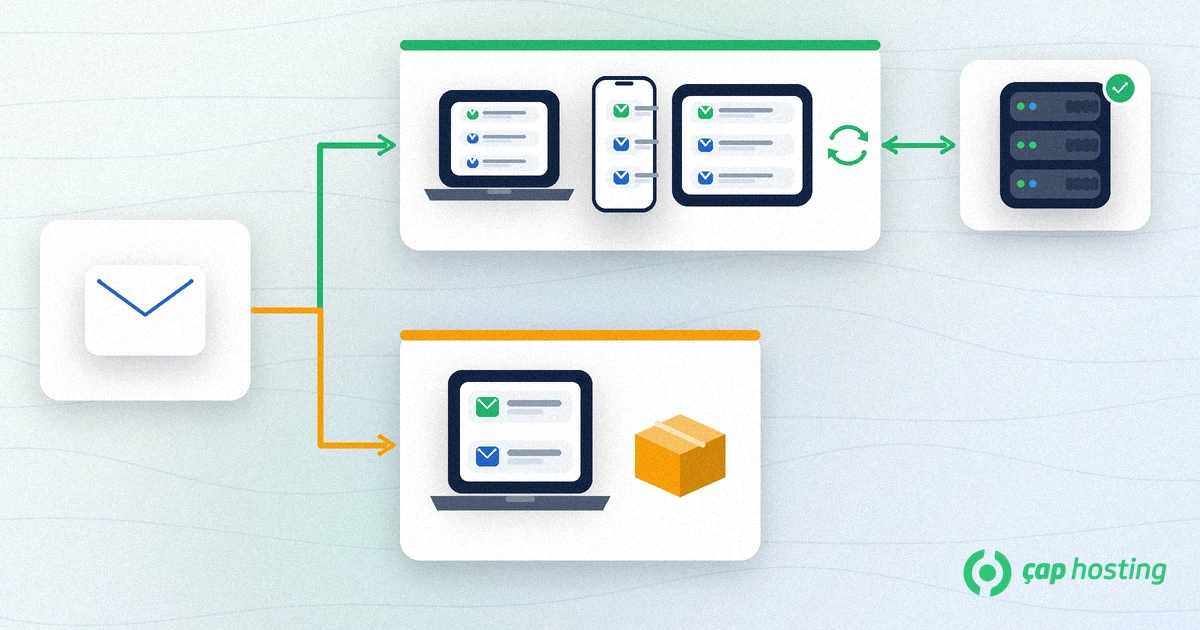
Today most employees use the same business address on a computer, a phone and sometimes webmail. In that situation IMAP is almost always the right choice.
A message you read on your office desktop also shows as read on your phone, and a reply you send is stored in "Sent Items" on the server, reachable from every device. For sales, support or management teams that switch between the field and the office, that consistency is a big relief.
For mailboxes several people watch, such as info@ or support@, POP3 can pull messages onto whichever device connects first and hide them from everyone else. With IMAP everyone sees the same mailbox and the same folders.
For a mailbox used from a single computer, where messages must be archived locally and should not take server space, POP3 is still an option. Make sure that local archive is backed up regularly; if the computer fails, there may be no copy left on the server.
Modern IMAP clients cache messages and let you read them offline. "Reading without internet" is therefore not, on its own, a reason to choose POP3.
The one thing IMAP needs attention for is quota. As the mailbox grows on the server you get closer to your hosting plan's email space. Archiving large attachments, cleaning old folders regularly and upgrading the plan when needed solve that.
Whichever protocol you pick, the connection must be encrypted. RFC 8314, which recommends TLS for email submission and access, treats cleartext connections as obsolete. These are the values for ÇAP Hosting business email accounts:
mail.caphosting.netFor step-by-step device setup, see our guide to IMAP and SMTP settings on Outlook, iPhone and Android. If you have not created the mailbox yet, start with creating an email account in CWP.
On an account that has used POP3 for years, older messages may exist only on your computer. Follow this order to switch without losing mail:
Every message uploaded to the server uses mail quota, so check your quota before moving a large archive. If you are moving email as part of a host change, our guide on how to migrate a website to a new host clarifies the order.
The value of business email is that the whole team can rely on the same information from any device. For most businesses the right start is therefore IMAP, the correct port and authentication with the full email address. If you get stuck on the settings, our support team will help.
Security depends on encrypting the connection more than on the protocol. With SSL/TLS (IMAP 993, POP3 995) or STARTTLS on either, the password and content travel encrypted.
In most clients the default is to remove downloaded messages from the server. A 'leave a copy on the server' option can change that, but folders still do not sync.
Usually one of the devices downloaded it with POP3 and removed it from the server. Setting the account up as IMAP on every device fixes this.
On ÇAP Hosting, SMTP uses 465 (SSL/TLS) or 587 (STARTTLS); the server is mail.caphosting.net and the username is your full email address.
 Copyright © 2026 All Rights Reserved

 Turkey (Türkçe)
 Worldwide (English)