In short: To check SSL certificate expiry, read the "notAfter" date stored in the certificate; after that date browsers no longer treat your site as secure. You can check it in two ways: open the certificate details from the security icon to the left of the address bar in your browser, or run an openssl command in a terminal. openssl reads the date straight from the certificate the server sends and also lets you check the remaining time automatically.
Every SSL certificate has a start date (notBefore) and an end date (notAfter). Once the end date passes, browsers show visitors a security warning and most of them leave. To learn what a certificate does, read our what is an SSL certificate article.
Certificate lifetimes are also getting shorter. Under the schedule adopted by the CA/Browser Forum, certificates issued from 15 March 2026 can be valid for at most 200 days, from 15 March 2027 for 100 days and from 15 March 2029 for 47 days (CA/B Forum SC-081v3). The shorter the lifetime, the more it matters that renewal is automated and the expiry date is checked regularly.
In the example in this article, the caphosting.net certificate was issued on 22 October 2026 and expires on 20 January 2027, so it is a certificate of about 90 days. If your site has only just moved to HTTPS, our HTTP to HTTPS migration guide covers what to do after the certificate is installed.
Menu names differ by browser and version, but the order of the steps is usually the same. The browser only shows the certificate of the address you are connected to, so if you use several subdomains, check each one separately.
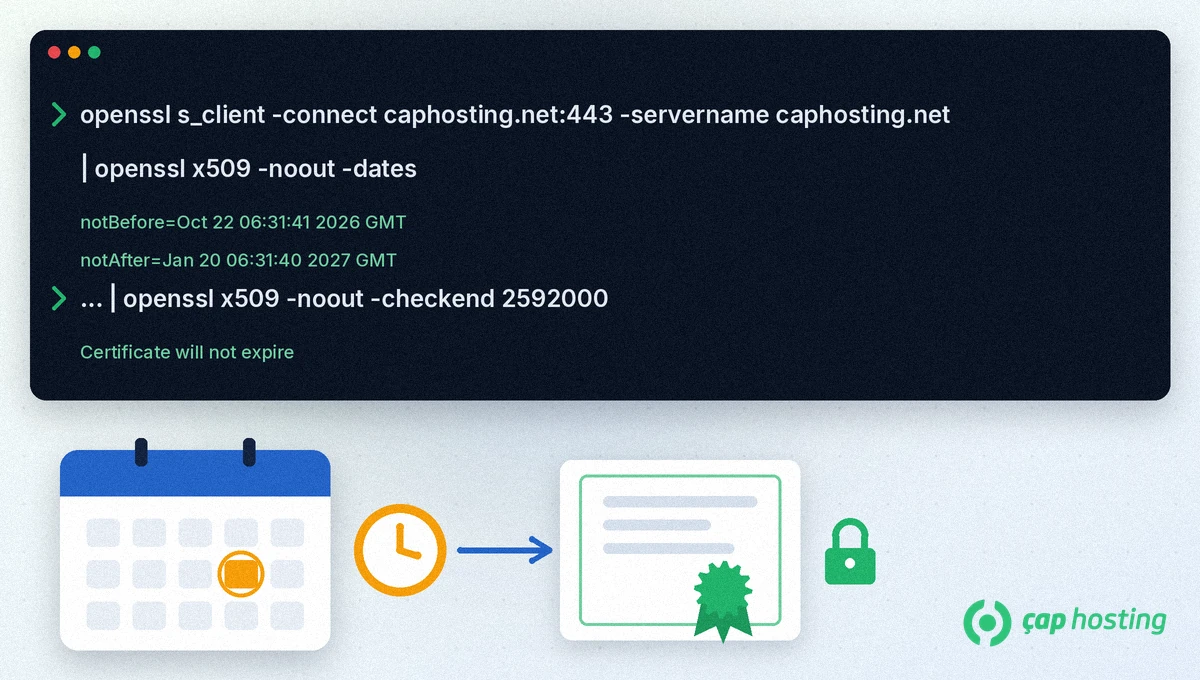
openssl usually comes preinstalled on Linux and macOS. This command fetches the server's certificate and prints its dates (replace the domain with your own):
echo | openssl s_client -connect caphosting.net:443 -servername caphosting.net 2>/dev/null | openssl x509 -noout -dates
On 13 November 2026 the output for caphosting.net was:
notBefore=Oct 22 06:31:41 2026 GMT
notAfter=Jan 20 06:31:40 2027 GMT
The notAfter line is the expiry date, given in GMT. The -servername option tells the server which domain you want, so that you get the right certificate when several sites share one server. To print only the expiry date, use -enddate instead of -dates (openssl x509 documentation).
The -checkend option tests whether the certificate expires within a given number of seconds. 30 days is 2592000 seconds:
echo | openssl s_client -connect caphosting.net:443 -servername caphosting.net 2>/dev/null | openssl x509 -noout -checkend 2592000
If the certificate will not expire within 30 days, the output is "Certificate will not expire" and the command exits with code 0; if it will, the command exits with a non-zero code. You can run it in a scheduled job and send yourself an alert whenever the result is non-zero.
Another check that matters as much as the date is whether the certificate includes the right names. Replace -dates at the end of the command with -ext subjectAltName to list the names in the certificate. For example, the caphosting.net certificate includes both caphosting.net and *.caphosting.net.
The site keeps running on the server, but browsers show visitors a security warning, which makes most of them leave.
openssl prints the dates in GMT. Convert them to your local time zone if needed.
If openssl is installed, the same commands work. If it is not, use the browser method or run the command on a Linux server.
Yes. Each address can use a different certificate, so change the domain in the command and check each address on its own.
 Copyright © 2026 All Rights Reserved

 Turkey (Türkçe)
 Worldwide (English)