In short: What is DNSSEC? DNSSEC (DNS Security Extensions) is a security extension that digitally signs your domain's DNS records. A validating DNS resolver checks those signatures and rejects forged or altered answers. You can check whether DNSSEC is enabled for your domain with the dig DS command, and whether it works with the ad flag in dig +dnssec output or with tools such as DNSViz.
In plain DNS, a resolver cannot verify that an answer really came from your domain's DNS server or that it was not changed on the way. According to RFC 4033, DNSSEC closes both gaps: it authenticates the origin of the answer and protects the integrity of the data. That makes attacks that try to send visitors to a fake address much harder.
It is just as important to know what DNSSEC does not do: it does not encrypt DNS queries, so it provides no confidentiality, and it does not protect against denial of service (DoS) attacks. It does not replace your site's SSL certificate either.
DNSSEC adds a few new record types to the familiar A, MX, CNAME and TXT records:
| Record | Purpose |
|---|---|
| DNSKEY | Holds the zone's public keys. The key with flag 257 is usually the key signing key (KSK), the one with flag 256 the zone signing key (ZSK). |
| RRSIG | The digital signature of each record set. The resolver verifies it with the DNSKEY. |
| DS | A digest of your domain's key, published in the parent zone (for example .com). This record builds the chain of trust. |
| NSEC / NSEC3 | Proves, with a signature, that a record really does not exist. |
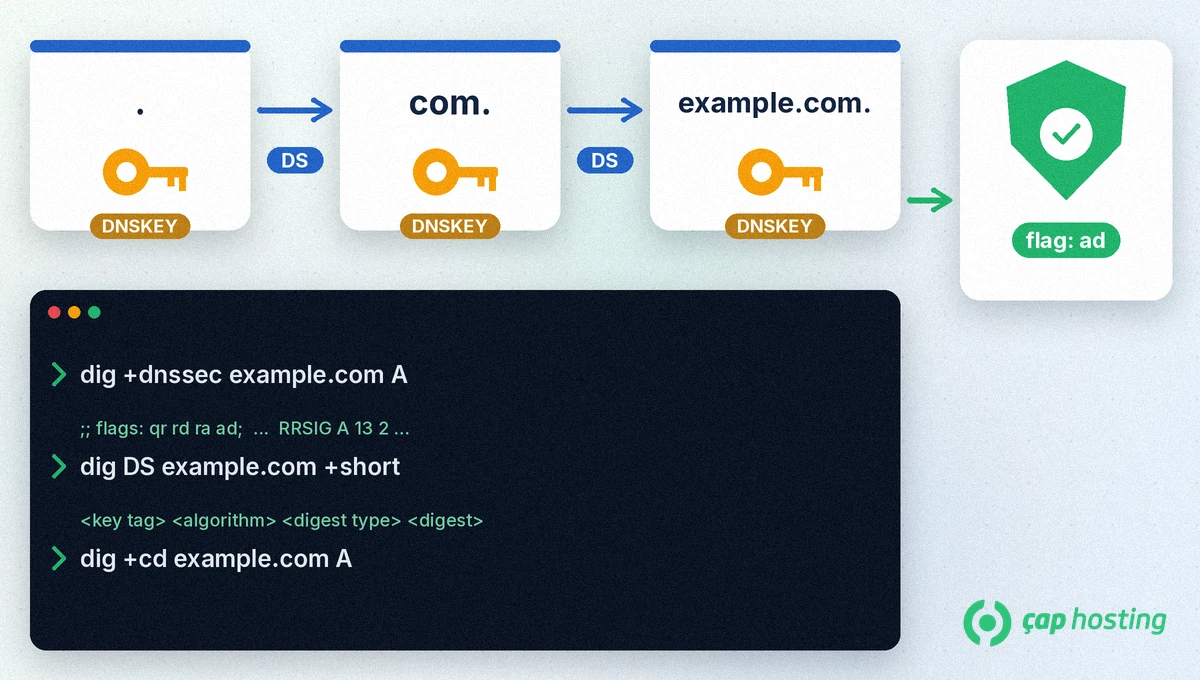
Validation starts at the root zone. The root signs the DS record of a top-level domain such as .com, and the .com zone publishes the DS record of your domain. At every step, the resolver checks that the DS record in the parent zone matches the DNSKEY in the child zone. If the whole chain validates, the answer is trusted.
That is why DNSSEC needs two parties: the provider that hosts your domain's DNS signs the zone, and your domain registrar passes the DS record to the parent zone.
dig DS yourdomain.com +shortad in the flags: line and the answer includes an RRSIG record, DNSSEC is validating.dig +dnssec yourdomain.com A @1.1.1.1We explain how to use dig in detail in our guide to checking DNS with dig and nslookup.
| What you see | What it means |
|---|---|
No DS record, no ad flag | DNSSEC is not enabled. Your domain works with plain DNS. |
DS record present, ad flag present | DNSSEC is enabled and validating. |
Answer is SERVFAIL, but an answer comes back with +cd | Most likely a DNSSEC error, for example a DS record that does not match the DNSKEY. Validating resolvers cannot resolve your domain. |
dig +cd yourdomain.com A @1.1.1.1The +cd option asks the resolver to skip validation. If you get an answer with this option but not without it, the problem is not in your records but in the DNSSEC signatures or the DS record.
DNSSEC adds signatures to answers, so the answers get slightly larger. On most sites visitors will not notice a difference; the goal is correct answers, not speed.
No. DNSSEC makes sure DNS answers are genuine, while an SSL certificate encrypts the connection between the browser and your site. The two complement each other.
Only resolvers that validate DNSSEC set the ad flag. Send the query to a validating resolver such as 1.1.1.1. If your domain has no DS record, the ad flag will not appear anyway.
 Copyright © 2026 All Rights Reserved

 Turkey (Türkçe)
 Worldwide (English)