In short: Apache and Nginx are the two most common web servers, the software that receives a visitor's request and sends the page back. Apache is easy to manage on shared hosting thanks to its modules and .htaccess support; Nginx uses an event-driven design that handles many simultaneous connections with little memory. On many servers the two run together, with Nginx in front and Apache behind it.
When you compare hosting plans or set up a VPS, you will see names like "Apache", "Nginx" or "LiteSpeed" in the technical specs. For most site owners this looks like a minor detail at first. Yet as soon as you want to write a redirect rule, add a security header or understand why your site slows down under heavy traffic, the web server you are running directly affects the job. This article compares how the two servers work, how they run PHP sites, how their configuration differs and when each one is the better fit.
When a browser requests an address, the web server is the first piece of software on the server that handles it. Its job is to read the request, work out which site and file it belongs to, send static files (images, CSS, JavaScript) directly, and pass dynamic pages (such as PHP) to the right application before returning the result to the visitor. Redirects, HTTPS, compression and response headers are also handled at this layer.
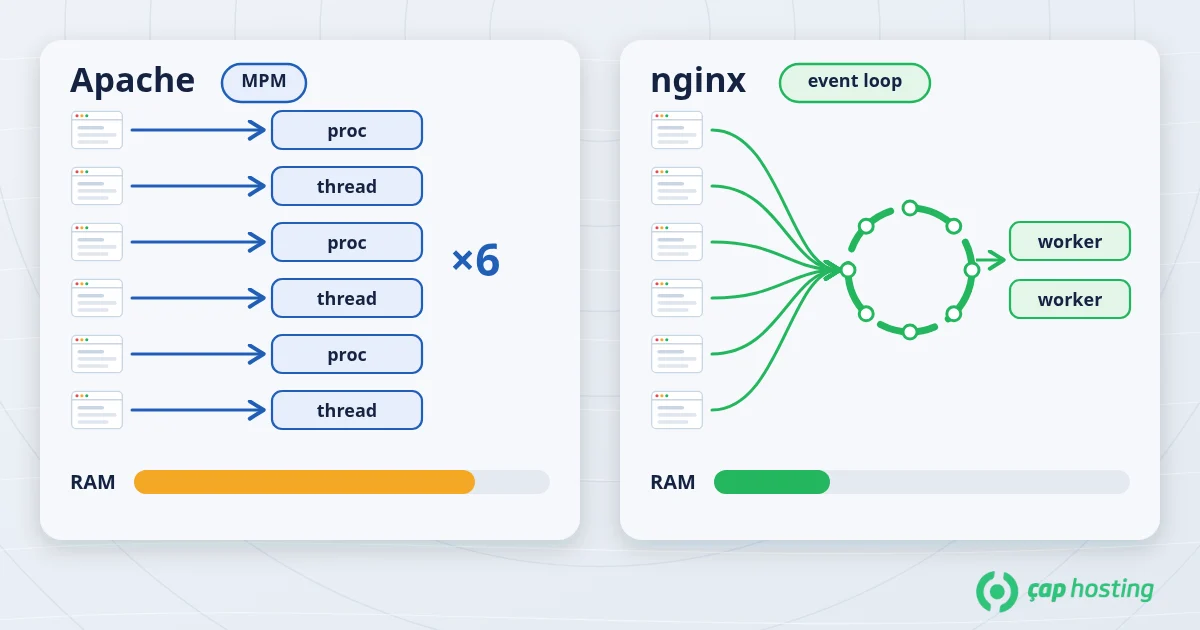
Apache handles connections through modules called MPMs (Multi-Processing Modules). prefork uses a separate process per connection, while worker and event use threads inside processes. In the classic model every concurrent connection ties up a process or thread, so memory use grows with the number of connections. The event MPM, the default on modern installations, reduces this load by handling idle keep-alive connections separately. See the Apache MPM documentation for details.
Nginx runs a small number of worker processes, and each one moves thousands of connections forward in an event loop. While one connection waits for data, the process does not sit idle; it moves on to others. This approach uses memory efficiently, especially for static files and for many slow or long-lived connections. The official beginner's guide explains the basic structure of Nginx.
On PHP-based sites such as WordPress, the real work is executing PHP code. Here the two servers behave differently:
mod_php) or pass the request to a separately running PHP-FPM through proxy_fcgi. PHP-FPM is the usual choice today because each site's PHP version and resource limits can be set separately.In practice this means the speed of PHP pages usually depends more on the PHP version, caching and the database than on the web server. If you are on an old PHP version, start with our PHP version update guide.
This is the difference site owners notice most. In addition to the server configuration, Apache reads the .htaccess file in each directory. That lets you define redirects, access restrictions or response headers without being the server administrator. For example, you can redirect a domain with a 301 or password-protect a folder on shared hosting with a few lines in .htaccess.
That flexibility has a cost: on every request Apache looks for and reads the .htaccess files in the relevant directories. The Apache documentation itself notes that if you have access to the server configuration, putting the rules there is more efficient (.htaccess tutorial).
Nginx has no .htaccess. All rules live in server and location blocks in the central configuration, and the service is reloaded after a change:
nginx -t && systemctl reload nginx
If you are new to managing services, our article on managing services with systemctl will help. As an example of the same task on both servers, WordPress "pretty permalinks" are written as RewriteRule lines in .htaccess on Apache and as a single directive on Nginx:
location / {
    try_files $uri $uri/ /index.php?$args;
}
| Topic | Apache | Nginx |
|---|---|---|
| Connection model | Processes/threads (MPM: prefork, worker, event) | Event-driven, few worker processes |
| Static files | Good | Very efficient, low memory |
| PHP | mod_php or PHP-FPM | PHP-FPM only (FastCGI) |
| Per-directory settings | .htaccess supported |
None; central configuration |
| Applying changes | .htaccess takes effect immediately |
Test + reload required |
| Typical use | Shared hosting, multi-user panels | VPS, high traffic, reverse proxy and load balancing |
On many hosting servers the two are partners rather than rivals. Nginx listens on ports 80 and 443 as a reverse proxy, serves static files itself and passes dynamic requests to Apache behind it. This combines Nginx's efficient connection handling with Apache's .htaccess compatibility. Site owners can still write .htaccess rules in this setup, although those rules may not apply to static files that Nginx serves directly. Apache-compatible servers such as LiteSpeed also read .htaccess files and offer similar compatibility.
The response headers usually tell you:
curl -sI https://yourdomain.com | grep -i "^server"
You will see a value such as server: Apache, server: nginx or server: LiteSpeed. The header may be hidden, or a CDN in front of the site may show its own name; in that case ask your hosting provider. We also explain how to read response headers in our HTTP security headers article.
.htaccess is supported, since WordPress and most common software write rules to it..htaccess flexibility, Apache or Nginx in front of Apache is more practical. See VDS vs VPS for server types.Switching is not just a software swap. Every redirect, access and caching rule in your .htaccess files must be translated to Nginx syntax; otherwise redirects stop working and protected directories may be left open. Before migrating, list your existing .htaccess files, map each rule and try the change on a test environment first.
Apache stands out for flexibility and compatibility, Nginx for efficiency and scalability, and used together they combine the strengths of both. On shared hosting the choice is made for you; on a VPS you can decide based on what your site needs. If you want to know which setup your server runs or need help with configuration, open a support ticket and our team will help.
No. Nginx uses fewer resources for static files and many concurrent connections, but the speed of PHP pages depends mostly on PHP-FPM, caching and the database. A well-tuned Apache is enough for most sites.
No, Nginx does not read .htaccess files. The rules need to be translated into the Nginx configuration. In setups with Nginx in front of Apache, .htaccess still applies to requests that reach Apache.
Yes. The most common approach is Nginx acting as a reverse proxy on ports 80/443 and forwarding some requests to Apache listening on a different port. The two cannot listen on the same port at the same time.
The software itself does not affect rankings. But if redirects break or pages return errors during the switch, search engines will notice. Test your key URLs and redirects after migrating.
 Copyright © 2026 All Rights Reserved

 Turkey (Türkçe)
 Worldwide (English)