In short: PHP limits are the settings that decide how much memory a script may use (memory_limit), how large an upload it may accept (upload_max_filesize and post_max_size) and how long it may run (max_execution_time). "Allowed memory size exhausted", "Maximum execution time exceeded" or uploads that silently disappear usually mean one of these limits has been hit. Knowing which limit controls what lets you fix the problem with the right setting, in the right place.
A blank screen while updating a plugin, an error when uploading a 20 MB video, or the last items of a long menu vanishing after you save it are everyday situations for hosting customers. What they have in common is the guard rails PHP puts in place to protect the server. In this article we explain the PHP limits you will meet most often, PHP's official default values, how the limits relate to each other, how to see your current values and which file to change them in.
On shared hosting, or on any single server, many sites share the same CPU and memory. PHP limits work like a fuse: a faulty or poorly written script is stopped at a certain point and logged, so other sites are not affected. The problem is not that limits exist, but that they are not tuned to what your site actually needs.
The defaults below are PHP's own defaults (PHP core configuration documentation). Hosting providers and control panels usually set different values, so check the real values on your server using the methods described further down.
| Setting | PHP default | What it limits | Typical symptom |
|---|---|---|---|
memory_limit |
128M | Maximum memory a script may allocate | "Allowed memory size of ... bytes exhausted", blank page |
upload_max_filesize |
2M | Size of a single uploaded file | "The uploaded file exceeds the upload_max_filesize directive" |
post_max_size |
8M | Total size of a form submission | The form comes back empty as if nothing happened |
max_execution_time |
30 (seconds) | How long a script may run | "Maximum execution time of 30 seconds exceeded" |
max_input_vars |
1000 | Number of input fields accepted per request | Part of a long menu or settings form is not saved; "Input variables exceeded" in the error log |
Sets the maximum amount of memory a PHP script may allocate. In applications such as WordPress every plugin and theme uses part of that memory; if a heavy page builder, a large import or image processing goes over the limit, the script stops and you see the WordPress critical error screen or a blank page.
upload_max_filesize limits each individual file, while post_max_size limits the whole body of the form submission. According to the PHP documentation, post_max_size must be larger than upload_max_filesize if you want to upload large files. When the submitted data exceeds post_max_size, PHP leaves $_POST and $_FILES empty, so the visitor sees a reset form instead of a clear error. For very large files, uploading via FTP is often more practical than the browser.
The longest time a script may run before it is terminated. The default is 30 seconds; on the command line (CLI) it is 0, meaning no limit (PHP runtime configuration documentation). Long backups, imports and bulk email jobs can hit this limit. Keep in mind that the web server and any proxy in front of it have their own timeouts too; raising the PHP limit alone may not make HTTP errors such as 504 go away.
These settings should not be considered in isolation. For uploads the correct order is upload_max_filesize < post_max_size, and the PHP documentation also notes that, generally speaking, memory_limit should be larger than post_max_size. If you raise only upload_max_filesize to 64M and leave post_max_size at 8M, a 20 MB file will still fail.
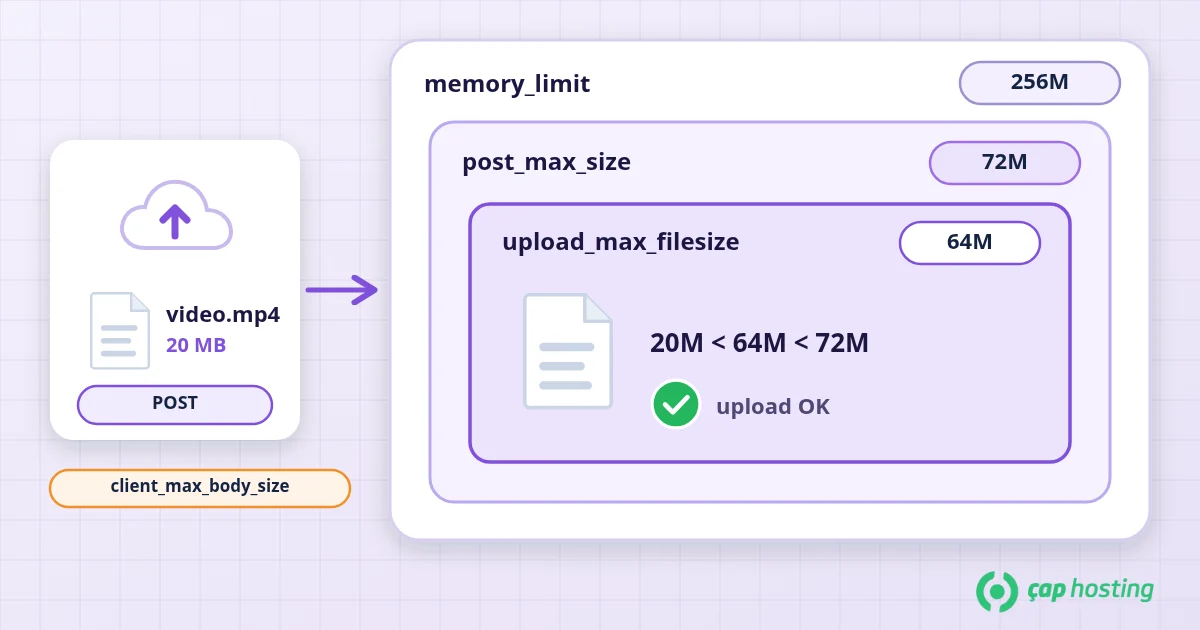
If the server runs Nginx, the request can be stopped by Nginx's client_max_body_size before it ever reaches PHP; in that case the browser shows "413 Request Entity Too Large". We cover the differences between web servers in our Apache vs Nginx article.
<?php phpinfo(); and open it in the browser. The page reveals a lot about the server, so delete the file right after checking.Over SSH, php -i shows the values of the command-line PHP, which may differ from the PHP-FPM or module settings your website actually uses. Use one of the methods above to see what the site sees.
Which method works depends on how PHP runs on the server:
.user.ini file in the site directory is read. By default it can take up to 300 seconds for changes to apply (.user.ini documentation).php_value lines only work when PHP runs as an Apache module; on servers using PHP-FPM they can cause a 500 error.memory_limit and max_execution_time. upload_max_filesize and post_max_size cannot be changed this way because the upload is received before the script runs.A sample .user.ini:
memory_limit = 256M
upload_max_filesize = 64M
post_max_size = 72M
max_execution_time = 120
max_input_vars = 3000
These values are a starting example, not fixed recommendations for every site. Values above the ceiling allowed by your package will not take effect.
In WordPress, the WP_MEMORY_LIMIT constant in wp-config.php only sets the memory WordPress itself will use and cannot exceed what the server allows. According to the WordPress documentation, by default it tries to allocate 40 MB on a single site and 64 MB on multisite (wp-config.php documentation).
No. A memory error sometimes comes from a genuinely large job and sometimes from a plugin stuck in a faulty loop. In the second case, a higher limit only postpones the problem and wastes server resources. First check the error log to see which file hit the limit; if the problem started with a single plugin, update or replace it. Old PHP versions are also at a disadvantage for memory use and performance; our PHP version update article walks you through the switch.
If your shared hosting package needs a value you cannot set from the panel, or a change does not take effect, open a support ticket describing what you need and the error message you see; our team will help you choose a value that suits your package.
Most likely post_max_size is still smaller than the new limit, or, if the server runs Nginx, you are hitting client_max_body_size. Changes made in .user.ini can also take a few minutes to apply.
The value is a ceiling for each individual script. A very high value lets a faulty script consume a lot of memory for a long time and, together with concurrent requests, can put pressure on the server's memory.
Undo the lines you just added. The most common cause is adding php_value lines to .htaccess on a server that uses PHP-FPM; in that case use .user.ini or the control panel instead.
 Copyright © 2026 All Rights Reserved

 Turkey (Türkçe)
 Worldwide (English)