In short: Email forwarding means the mail server automatically sends messages that arrive at one address on to another address. It is handy for passing a colleague's mail to someone else during a holiday or for getting info@ messages to the right person. However, mail forwarded to an outside address can fail SPF checks and land in spam, and company data leaves the company. That is why forwarding should be planned with a clear purpose, an end date and its alternatives in mind.
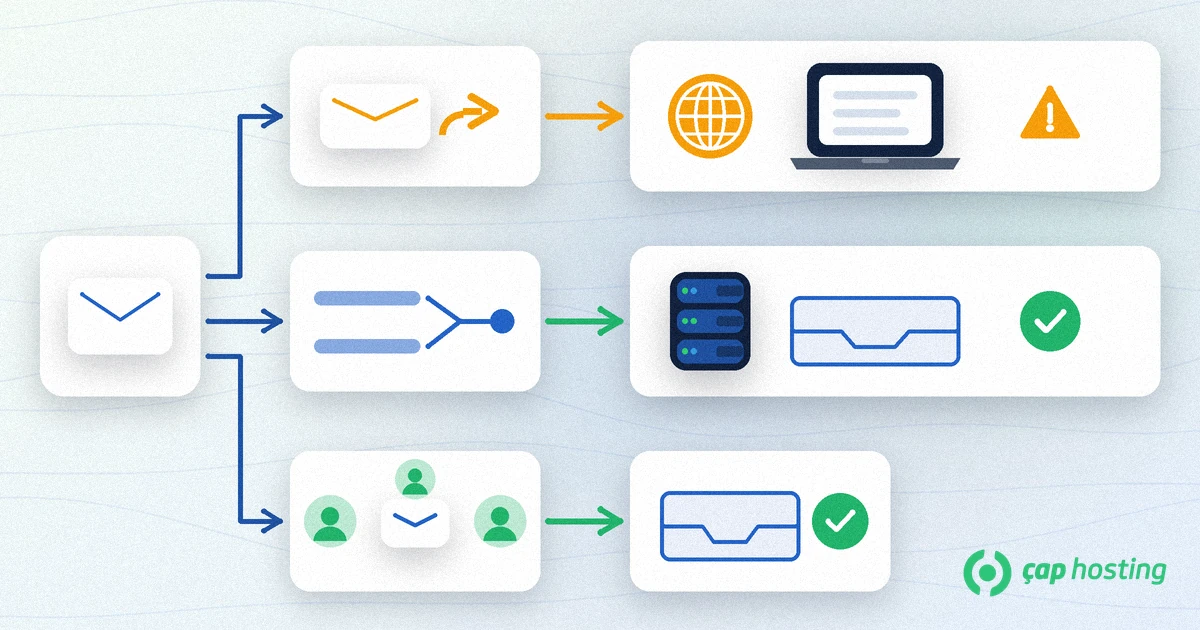
Email forwarding means the server sends a copy of every incoming message in a mailbox to another address you specify. It happens on the mail server, not on the employee's computer, so it works even when nobody is logged in.
With ÇAP Hosting business email, incoming mail first reaches your domain's mail server (mail.caphosting.net). If forwarding is set up, the server re-sends the message to the target address. Most panels offer two options: keep a copy in the original mailbox or forward only. Keeping a copy is safer for your records but the mailbox can fill up; we covered quotas in email quota full.
Forwarding works well for a short period and a clear purpose:
If several people need to see the same mail permanently, or mail must not leave the company, other methods fit better:
| Method | How it works | When it fits |
|---|---|---|
| Forwarding | Incoming mail is copied to another address | Temporary handover, domain change |
| Alias | A second address delivers into the same mailbox | One person with several addresses |
| Shared mailbox | Several authorised people connect to one mailbox | Team addresses such as info@ or support@ |
| Second account in the client | The user adds the second address as a separate account in Outlook or on the phone | When mail should stay on the server |
Using IMAP for a shared mailbox or a second account keeps read and moved messages in sync on every device; see IMAP vs POP3 for the differences. With a shared mailbox, know who has access and remove access for people who leave, rather than passing one password around.
The main reason is SPF. An SPF record lists which servers may send mail on behalf of a domain. When a customer emails you, the first delivery comes from the customer's own server and passes SPF. But when your server forwards that message to, say, a Gmail address, the receiving side now gets it from your server. The sender address still shows the customer's domain, and your server is not in the customer's SPF record, so SPF can fail. The SPF standard RFC 7208 describes these unintended failures caused by forwarders in Appendix D, and one remedy: the forwarding server rewriting the envelope sender (MAIL FROM) into its own domain.
DKIM, on the other hand, signs the message headers and body. If the message is not changed on the way, the signature stays valid after forwarding. DMARC checks whether SPF or DKIM passes and aligns with the sender's domain, so messages whose DKIM signature survives usually still pass DMARC after forwarding. Read more in what is DMARC and, for your own domain's record, how to create an SPF record.
Spam itself is another risk. If unwanted mail that reaches you is forwarded outside without filtering, the receiving service sees it as coming from your server. This can hurt the sending reputation of the forwarding server. We explain the general reasons why mail lands in spam in this knowledge base article.
Forwarding business mail to an employee's personal Gmail or Outlook.com account is common but risky:
You can set up forwarding in your hosting control panel; if you are unsure, open a support ticket and the ÇAP Hosting team will help. Stating which address should go to which, for how long and whether a copy should be kept speeds things up.
Email forwarding is a useful tool for short handovers and domain changes. For permanent team addresses a shared mailbox or an alias is better, and instead of forwarding outside, adding the business account to the user's phone is safer. If forwarding to an outside address is unavoidable, keep in mind that SPF may fail, that DKIM and DMARC matter, and that spam should be filtered first.
Forwarding copies each incoming message to another mailbox. An alias is a second address whose messages are delivered into the same mailbox, so no separate copy is created.
The forwarding server is not listed in the original sender's SPF record, so SPF can fail. If the message is DKIM-signed and unchanged, DMARC usually still passes. Spam forwarded without filtering can also lower the forwarding server's reputation.
It is a common way to avoid losing customer mail during the handover. Set an end date, forward to an internal address and add an auto-reply that points senders to the new contact.
Usually yes. The copy makes sure messages are not lost if something goes wrong at the target address. Check the quota regularly so the mailbox does not fill up.
 Copyright © 2026 All Rights Reserved
 Turkey (Türkçe)
 Worldwide (English)