In short: In MySQL and MariaDB, the character set called utf8 is really utf8mb3, which uses at most 3 bytes per character and cannot store 4-byte characters such as emoji. utf8mb4 supports all of UTF-8. Using utf8mb4 for new databases and converting older ones in a planned way prevents most character and emoji problems.
Emoji turning into question marks after a form submission, comments being cut off, or accented letters showing up as garbled sequences like "é" are common problems for hosting customers. Most of the time the cause is not a server or software bug but the character set used by the database and the connection. This article explains the difference between utf8 and utf8mb4, how to choose a collation, how to check your current setup and what to watch out for when converting.
A character set decides which bytes are used to store text in the database. A collation defines how that text is compared and sorted: case sensitivity, whether accented letters count as equal, and alphabetical order. Every table and column has a character set and a collation; if none is set, the database or server default is used.
The UTF-8 standard encodes a character in 1 to 4 bytes (RFC 3629). Basic Latin letters take 1 byte, most European letters 2 bytes, and most Chinese and Japanese characters 3 bytes. Emoji and some special symbols need 4 bytes.
The old utf8 character set in MySQL and MariaDB was designed to store at most 3 bytes per character and is now called utf8mb3. According to the MariaDB documentation, utf8 is an alias for utf8mb3 by default, while utf8mb4 uses the same encoding but also stores 4-byte characters (MariaDB Unicode documentation). As a result:
utf8mb3 and utf8mb4.utf8mb4. When written to a utf8mb3 column, depending on the server's SQL mode you either get an error, or the text is truncated or the characters are saved as ?.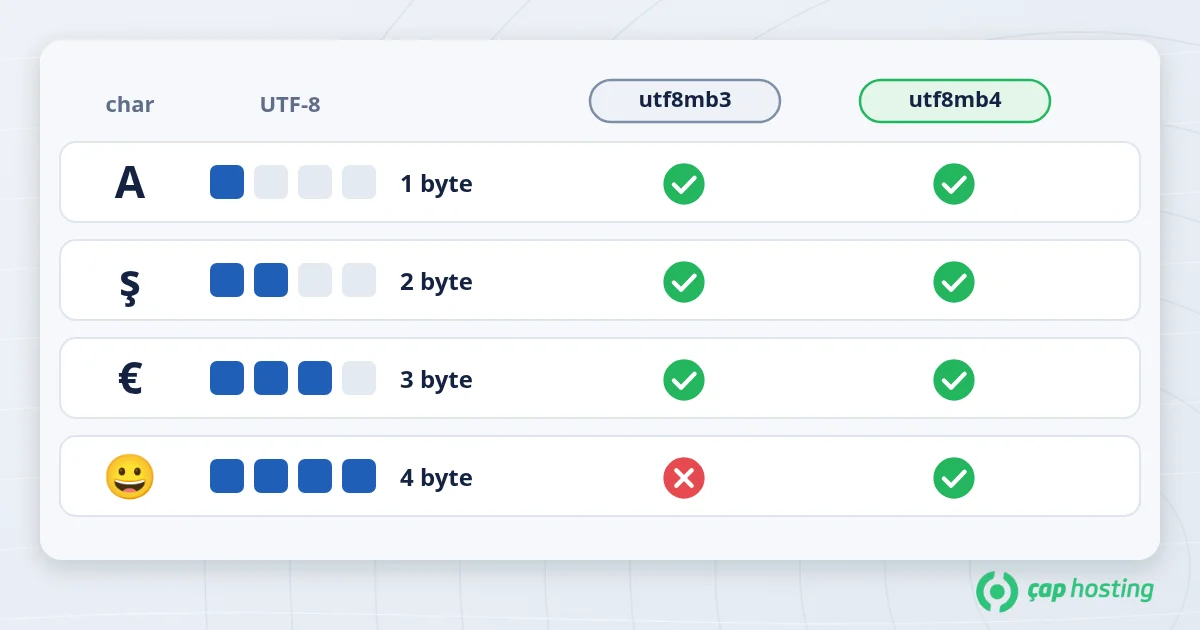
| Feature | utf8 (utf8mb3) | utf8mb4 |
|---|---|---|
| Maximum per character | 3 bytes | 4 bytes |
| Accented European letters | Supported | Supported |
| Emoji and 4-byte symbols | Not supported | Supported |
| Index length (with a 767-byte limit) | 255 characters | 191 characters |
| For new projects | Avoid | Default choice |
utf8mb4_unicode_ci: based on Unicode sorting rules; a safe, common choice for multilingual sites.utf8mb4_general_ci: uses simpler rules; sorting and comparison can be less accurate for some characters.utf8mb4_turkish_ci: applies Turkish-specific rules, for example matching and sorting "i/İ" and "ı/I" according to the Turkish alphabet. Worth considering only for Turkish-only applications.utf8mb4_0900_ai_ci: introduced with MySQL 8.0. Importing into MariaDB versions that do not recognise these names can cause an "Unknown collation" error.The last point matters most during migrations. If you see this error while loading a backup from a MySQL 8 server onto MariaDB hosting, you need to replace the collation name in the dump with a supported one (for example utf8mb4_unicode_ci). See MySQL vs MariaDB for other differences between the two servers and our hosting migration guide for the full move.
To see the server defaults from the SQL tab in phpMyAdmin or from the command line:
SHOW VARIABLES LIKE 'character_set%';
SHOW VARIABLES LIKE 'collation%';
To list the collation of each table (replace database_name with your own):
SELECT table_name, table_collation FROM information_schema.tables WHERE table_schema = 'database_name';
Collations starting with utf8_ or utf8mb3_ indicate the old character set, and those starting with latin1_ point to a setup prone to problems with non-English characters. If you want to run these queries over a remote connection, our remote MySQL connection article shows how.
Even with correct tables, data can be corrupted if the application connects to the database with a different character set. This is the most common cause of garbled text (mojibake): UTF-8 text is re-encoded on the assumption of another character set. In PHP applications, set the connection character set explicitly:
// PDO
$pdo = new PDO('mysql:host=localhost;dbname=database_name;charset=utf8mb4', $user, $password);

// mysqli
$db->set_charset('utf8mb4');
In WordPress this is set with the DB_CHARSET constant in wp-config.php; the value should be utf8mb4.
Conversion is hard to undo, so always take a full backup first. See our backup strategy article for the approach. Then convert the database default and the tables:
ALTER DATABASE database_name CHARACTER SET utf8mb4 COLLATE utf8mb4_unicode_ci;
ALTER TABLE table_name CONVERT TO CHARACTER SET utf8mb4 COLLATE utf8mb4_unicode_ci;
Things to watch:
VARCHAR columns can exceed the limit. For this reason WordPress shortened some indexes to 191 characters during its utf8mb4 upgrade in version 4.2 (WordPress developer note).CONVERT TO; it has to be handled separately.Choosing utf8mb4 with a suitable collation when you create a new database is the easiest way to avoid emoji and character problems later. For older projects, check the current state, take a backup and plan the conversion. If you need help checking or converting your database's character set, open a support ticket and our team will help.
No. These letters take 2 bytes, so utf8mb3 can store them. But if users can enter emoji in forms, comments or product descriptions, you need utf8mb4, and it should be the default for new projects anyway.
Stored text is encoded with the same bytes, so Latin and accented characters take the same space. Only 4-byte characters such as emoji take 4 bytes.
Usually the connection character set does not match the table's, or the data was imported with the wrong character set during a migration. Check the connection setting and the character set of the backup file first.
The backup uses a MySQL 8.0 collation that the target server does not recognise. Replace the collation name in the backup with one the target server supports and run the import again.
 Copyright © 2026 All Rights Reserved

 Turkey (Türkçe)
 Worldwide (English)