In short: What is a subdomain? A subdomain is a label added to the left of a domain you own. If you own example.com, then blog.example.com, shop.example.com and support.example.com are all subdomains. They let you publish a blog, a shop, a test environment or a separate application at its own address without buying a new domain, and setting one up takes a DNS record, a site folder on the server and an SSL certificate.
Internet addresses live in a tree-shaped naming system called DNS. At the top of the tree are extensions such as .com, .net or .com.tr; below them is the domain you registered; and below that are the subdomains you create (RFC 1034, DNS concepts). Each dot in an address separates one level, and you read it from right to left: in blog.example.com, "com" is the extension, "example" is your domain and "blog" is the subdomain.
If you have not yet read what a domain is and why it matters, our what is a domain name guide is a good starting point. The key property of a subdomain is that you do not have to buy anything new: if you own the domain, you also control the names below it.
A familiar example is "www". Technically, www.example.com is a subdomain; many sites send both the www and the non-www address to the same site.
A subdomain is useful when you want to publish a service that is clearly separate from the main site at its own address. Common uses:
You could publish the same content at example.com/blog instead of blog.example.com. Which one fits better depends on your technical setup. If the blog runs on the same software and server as the main site, a subfolder is usually simpler to manage. If different software, a different server or a different team is involved, a subdomain makes setup and maintenance easier.
When deciding, ask yourself: is the content a natural part of the main site? Will it share the same design and menu? Does it need separate software? Who will manage it? The answers usually make the right choice clear.
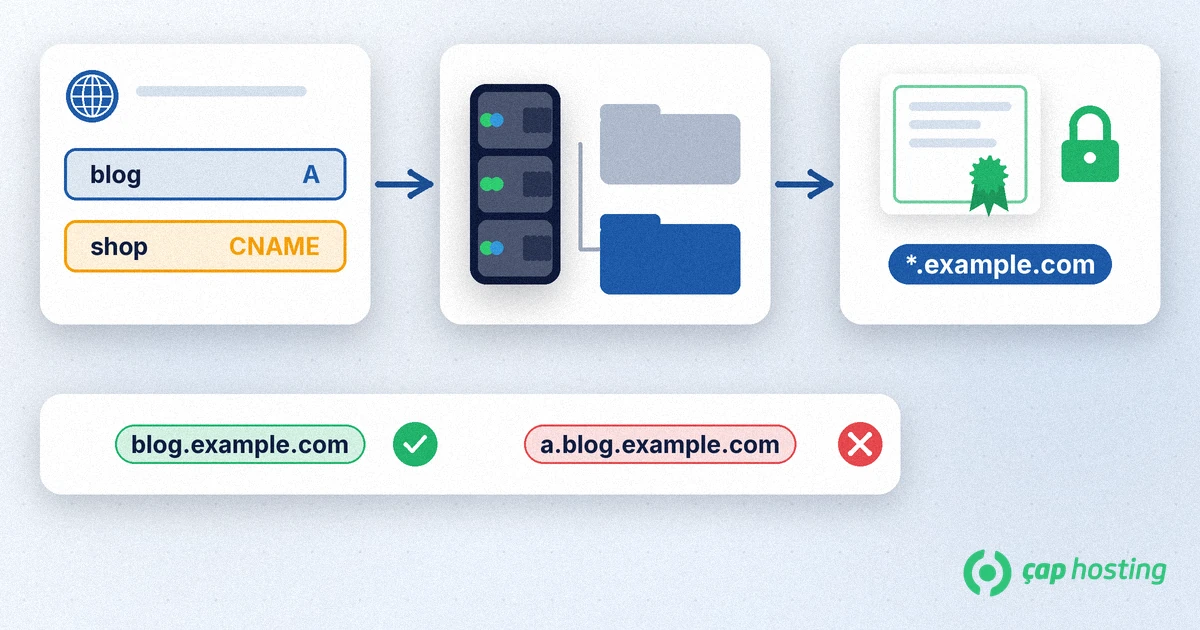
A wildcard certificate in the form *.example.com accepts exactly one level in place of the asterisk: blog.example.com and shop.example.com are covered, but a name two levels down such as a.blog.example.com is not (RFC 6125). A wildcard certificate also does not usually include the bare domain (example.com) itself, which is why certificates often list both names together.
If you want a wildcard certificate from Let's Encrypt, validation must use the DNS-01 method, which means adding a TXT record to the domain; HTTP-based validation cannot be used for wildcards (Let's Encrypt challenge types). If you only use a few subdomains, a separate certificate for each one is also a practical option.
Search engines see subdomains as separate addresses, so give each subdomain's page titles, internal links and sitemap their own attention. When you add a Domain property in Google Search Console, that property covers all subdomains and protocols together (Google Search Console help). For the verification steps, see our Search Console domain verification guide.
If you pointed a subdomain at an external service with a CNAME and later shut that service down, the DNS record may be left behind. Such a dangling record can let someone else claim that name on the same service and publish content on your subdomain; this is called a subdomain takeover (MDN: Subdomain takeovers). The fix is simple: when you retire a service, delete the DNS record that points to it first, and review your DNS records regularly.
No. If you own the domain, you create the subdomains below it yourself with DNS records; you do not need to buy another domain.
Technically, yes. www.example.com is a name below the example.com domain. Many sites send both addresses to the same site.
Not automatically. A subdomain needs its own certificate or a wildcard certificate in the form *.example.com, and a wildcard covers only one level.
The DNS record has to propagate, which depends on the record's TTL and on resolver caches. Once the record is visible and the site folder and certificate are ready, the address opens.
 Copyright © 2026 All Rights Reserved

 Turkey (Türkçe)
 Worldwide (English)